Getting a Lifeline application denied can be frustrating, especially when you believe you qualify for the program.
You may see a message about identity, address, income, a duplicate household, or missing documents. In other cases, your Lifeline application says pending, and you are not sure what you are supposed to do next.
The good news is that a denial or verification error does not always mean you are permanently ineligible.
The Lifeline National Verifier checks your information against different databases. It verifies things such as your identity, address, income or qualifying government program, and whether your household already receives a Lifeline benefit. If the system cannot verify your information automatically, you may be asked to provide supporting documents for manual review.
This guide explains the most common reasons for a denied Lifeline application and, more importantly, how to fix Lifeline application denied errors.
Read More: Lifeline Program Free Tablet
Why Was My Lifeline Application Denied?
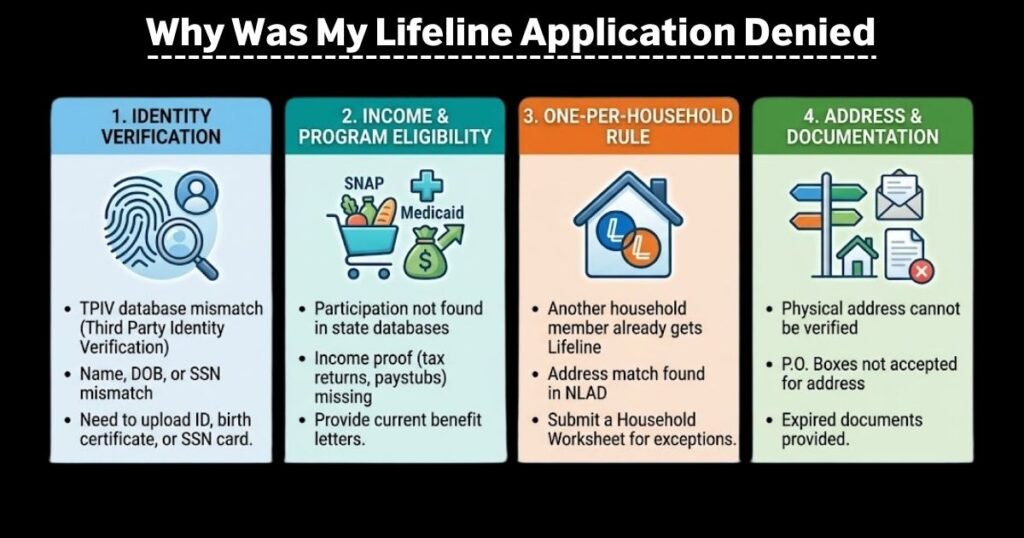
A Lifeline application can fail for several reasons. The most common include:
- Identity information could not be verified
- Your address could not be verified
- Someone at your address already receives Lifeline
- Your information appears to have a duplicate Lifeline benefit
- Your income could not be verified
- Your qualifying government program could not be verified
- Required supporting documents were missing or unacceptable
- The information on your application does not match official records
The National Verifier uses automated checks for identity, address, duplicate benefits, income, and qualifying-program participation. When those checks cannot confirm your information, additional documentation may be required.
Let’s go through each major problem.
1. Why Was My Lifeline Application Denied for Identity?
An identity verification error means the National Verifier could not confirm that the information on your application matches available records.
What it means
The system may have been unable to verify your:
- Name
- Date of birth
- Last four digits of your Social Security number
- Identity information
This does not automatically mean that your identity is invalid. It may simply mean the information could not be matched through the available databases.
Why it happened
Common reasons include:
- A spelling difference in your name
- Incorrect date of birth
- Incorrect SSN information
- Old government records
- Information entered differently from your official records
- The National Verifier could not find a matching record
Documents needed
Depending on the exact error, USAC may accept an official, unexpired document showing the information needed to verify your identity.
Examples include:
- Driver’s license
- U.S. passport
- Birth certificate
- Social Security card
- W-2
- Previous year’s tax return
- Government-issued ID
- Certificate of naturalization
- Certificate of U.S. citizenship
- Permanent resident card
- Government assistance documentation
The exact document depends on the verification problem. For example, a document used to resolve an SSN4 error must contain your first and last name and the last four digits of your SSN.
How to fix it
First, carefully compare the information on your Lifeline application with your official documents.
Make sure your name, date of birth, and other information are entered correctly.
Then submit the requested supporting document through the appropriate National Verifier process.
What happens next?
Your documentation can be reviewed manually.
USAC says online information submitted during its stated business hours is generally reviewed within minutes. Mailed documentation can take seven to 10 business days for a review decision.
2. Why Was My Lifeline Application Denied for Address?
An address error is another common reason a Lifeline application may not go through.
What it means
The National Verifier could not confirm your primary residence using its address verification systems.
This is sometimes called an Address Matching System (AMS) error.
Why it happened
Your address may be difficult for the system to match because:
- You live in a rural area
- Your address is new
- Your location does not have a standard mailing address
- Your address was entered incorrectly
- The database has a different version of your address
- Your physical residence is difficult to identify on standard mapping systems
Documents needed
Depending on the error, you may be able to use:
- Valid driver’s license
- Government-issued ID
- Utility bill
- Mortgage statement
- Lease statement
- W-2
- Recent tax return
- Government agency letter
- USPS confirmation of a deliverable address
You may also be asked to use the National Verifier mapping tool to identify your primary residence.
How to fix it
If you apply online and the system asks you to locate your residence on a map, follow the mapping instructions and place the pin at your primary residence.
If you are submitting a paper application, follow the address documentation instructions provided by USAC.
One important detail: a phone or internet bill from your Lifeline provider generally cannot be used as the utility bill for this type of address verification.
What happens next?
Once your address information or documentation is submitted, the National Verifier can continue the eligibility review.
If the information is accepted, your application can move forward instead of remaining stuck on the address error.
3. Lifeline Application Denied but I Qualify: What Does It Mean?
This is one of the most confusing situations.
You may participate in SNAP, Medicaid, SSI, or another qualifying program and still receive an error.
What it means
A denial or verification failure does not necessarily mean you are not eligible.
It can mean the National Verifier was unable to find or match your information in the databases available to it.
USAC explains that consumers can provide additional information when their eligibility cannot be verified through automated data sources.
Why it happened
Your qualifying benefit may not have matched the information in the system.
For example:
- Your name may be recorded differently
- Your benefit may be recently approved
- Your information may not yet appear in the available database
- The program information may have changed
- The National Verifier may need additional documentation
Documents needed
For qualifying-program eligibility, documentation should generally show:
- Your name or the name of your benefit-qualifying person
- The qualifying program
- The agency or organization that issued the document
- An appropriate issue date or expiration date
Examples can include official documentation for programs such as SNAP or other qualifying assistance programs.
How to fix it
Do not assume that you must start the entire application again.
Look at the exact verification error and provide the documentation requested for that error.
What happens next?
The Lifeline Support Center can manually review the documentation and determine whether you meet the program requirements.
4. Lifeline Application Denied Due to Duplicate Address
A duplicate address error can be especially confusing.
You may live with another person who receives Lifeline but still qualify yourself.
What it means
Lifeline generally provides one benefit per household, not one benefit for every individual living at the same address.
A household is generally people who live together and share income and expenses.
Why it happened
The system may detect another Lifeline subscriber at your address.
For example, you might:
- Rent a room in someone’s home
- Live with roommates
- Share an address with another family
- Live in a multi-household residence
- Have separate finances from another Lifeline subscriber
The address is the same, but the economic households may be different.
Documents needed
You may need to complete the Lifeline Household Worksheet.
The worksheet is used to help determine whether people at the same address belong to the same economic household.
How to fix it
Complete the Household Worksheet carefully.
Answer the questions honestly about whether you share income and expenses with the other Lifeline subscriber.
Do not create a second application simply to avoid the duplicate-address problem.
What happens next?
USAC reviews the household information to determine whether you are part of an independent economic household.
If you qualify under the household rules, your application can continue.
Your application may also fail because your income could not be verified.
USAC specifically states that consumers with a duplicate-address error must establish that they are an independent economic household through the required process.
5. Lifeline Application Denied Due to Income
What it means
You may have applied based on household income, but the National Verifier could not confirm your income information automatically.
This is different from automatically proving that your income is too high.
Why it happened
Possible reasons include:
- Your income records were not found
- Your income recently changed
- Your application information does not match available records
- You provided incomplete information
- Your documentation does not cover the required period
For 2026, Lifeline income eligibility is based on 135% of the federal poverty guidelines. For the 48 contiguous states, D.C., and territories, the annual limit is $21,546 for one person and $44,550 for a household of four. Alaska and Hawaii have higher limits.
Documents needed
USAC lists several acceptable types of income documentation, including:
- Previous year’s federal, state, or Tribal tax return
- Current employer income statement
- Pay stubs
- Social Security statement of benefits
- Veterans Affairs benefits statement
- Retirement or pension statement
- Unemployment or workers’ compensation statement
- General Assistance documentation
- Certain official documents showing income
If you use pay stubs or another document that does not cover a full year, additional documentation covering three consecutive months within the previous 12 months may be required.
How to fix it
Check the income information you submitted.
Then provide the type of documentation requested by the National Verifier.
Make sure the document is clear and contains the required information.
What happens next?
Your income documentation can go through manual review.
If your income meets the applicable Lifeline limit and your other eligibility requirements are satisfied, your application may be approved.
6. Lifeline Application Denied: What Should I Do?
If you are asking, “Lifeline application denied what should I do?”, start by finding the exact reason.
Don’t immediately submit another application.
What it means
A denial or application error tells you that something in the verification process needs attention.
Why it happened
The reason could be:
- Identity
- Address
- Income
- Qualifying program
- Duplicate subscriber
- Duplicate household
- Missing documents
Documents needed
The correct documents depend on the specific error.
For example:
Identity problem: ID or other accepted identity documentation.
Income problem: tax return, pay stubs, benefits statement, or other acceptable income proof.
Address problem: ID, utility bill, lease, mortgage statement, or other approved address documentation.
Duplicate address: Household Worksheet.
USAC provides separate documentation rules for each type of error.
How to fix it
Follow the error message rather than guessing which document to submit.
You can submit supporting documentation online or by mail through the Lifeline Support Center process.
What happens next?
Once your documents are reviewed, you should receive an eligibility decision.
If you still disagree with the decision, you may have an appeal option.
7. How to Fix Lifeline Application Denied Errors
The easiest way to fix a denied application is to treat the error like a checklist.
Step 1: Find the exact error
Read your application status carefully.
Don’t focus only on the word “denied.” Look for the specific reason.
Step 2: Check your information
Review:
- Full name
- Date of birth
- Address
- Household information
- Income
- Qualifying program
- Other Lifeline benefits
Step 3: Gather supporting documents
Use the document type that matches your error.
Do not send unnecessary personal documents.
Step 4: Submit the documents
Follow the National Verifier or Lifeline Support Center instructions.
USAC advises consumers submitting documentation by mail to send copies rather than original documents.
Step 5: Wait for review
Online submissions can often be reviewed much faster than mailed documents.
USAC says online documentation submitted during its business hours is reviewed within minutes, while mailed documentation generally takes seven to 10 business days for a decision.
8. Lifeline National Verifier Application Denied: What Is the National Verifier?
The Lifeline National Verifier is the centralized system used to determine whether consumers qualify for Lifeline.
USAC manages the National Verifier.
It checks information such as:
- Identity
- Address
- Income
- Qualifying government program participation
- Duplicate Lifeline benefits
Consumers can apply through the online consumer portal, with assistance from a participating service provider, or by mail.
Why can the National Verifier deny an application?
The system depends on automated data sources.
If it cannot find your information, it may require additional documentation.
So a Lifeline National Verifier application denied message does not always mean that you have no chance of approval.
What happens after documentation?
Supporting documentation can trigger a manual review by the Lifeline Support Center.
The reviewer can then determine whether the documentation proves your eligibility.
9. Lifeline Application Says Pending: What Does It Mean?
A Lifeline application says pending when your eligibility process has not yet reached a final decision.
What it means
Pending does not necessarily mean denied.
It may mean the application is still being processed or that additional information is needed.
Why it happened
Your application may need:
- Manual review
- Supporting documentation
- Identity verification
- Address verification
- Income verification
- Program eligibility verification
Documents needed
Check your application for a specific documentation request.
If documentation is requested, provide the type of document that matches the error.
How to fix it
If the application is simply pending, avoid submitting multiple applications unless you are instructed to do so.
Instead, check the application status and follow any instructions provided.
What happens next?
The application can move from pending to an eligibility decision after the required verification is completed.
If you cannot determine why the application is pending, the Lifeline Support Center can help with application-status questions. USAC lists the support center at (800) 234-9473, available seven days a week from 9 a.m. to 9 p.m. ET
10. Lifeline Application Denied Supporting Documents: What Do I Need?
The right supporting documents depend entirely on the error.
Here is a simple breakdown:
| Problem | Common supporting documents |
|---|---|
| Identity | Driver’s license, passport, birth certificate, government ID |
| SSN4 | Accepted official document showing name and last four SSN digits |
| Date of birth | Accepted official document showing name and DOB |
| Address | ID, utility bill, lease, mortgage statement, tax return |
| Income | Tax return, pay stubs, income or benefits statements |
| Qualifying program | Official program participation documentation |
| Duplicate address | Lifeline Household Worksheet |
| Proof of life | Recent utility bill, pay stub, lease/mortgage statement, benefits document |
These are examples, not a guarantee that every document will be accepted for every error. Always follow the specific documentation request associated with your application.
Can I Appeal a Lifeline Denial?
If you believe the decision is wrong, you may have an appeal option.
USAC states that an appeal of a USAC decision must generally be filed with USAC before an appeal can be taken to the FCC.
USAC must receive the appeal within 60 days after the date of its decision.
When appealing, include the decision you are challenging and supporting information that explains why you believe the decision should be reconsidered.
Don’t wait until the deadline is almost over.
What If Someone Is Using My Lifeline Benefit?
A duplicate subscriber problem can sometimes happen when the system believes you already have Lifeline.
If you do not recognize the existing Lifeline benefit, don’t simply create several new applications.
USAC says a duplicate subscriber dispute can be investigated when a prospective subscriber says they do not have an existing Lifeline benefit.
If you believe someone may have used your information fraudulently, contact the Lifeline Support Center.
How Long Does It Take to Fix a Lifeline Application?
The timing depends on how you submit the information.
USAC says information submitted online to resolve application errors during its business hours is reviewed within minutes. Documentation submitted by mail can take seven to 10 business days for a review decision.
A complicated application may take longer if additional information is required.
The best way to avoid unnecessary delays is to submit clear, current documents that directly address the error.
Frequently Asked Questions
Why was my Lifeline application denied even though I qualify?
You may qualify but still receive an error because the National Verifier could not automatically verify your information. You may need to provide supporting documents for manual review.
Can I reapply after a Lifeline denial?
Before reapplying, identify the reason for the denial and follow the appropriate correction process. Repeating the same application without fixing the underlying problem may not solve the issue.
What if my address is correct but Lifeline cannot verify it?
You may need to use the National Verifier mapping tool or submit an accepted address document. Rural and difficult-to-map addresses can require additional verification.
What if another person at my address has Lifeline?
You may still qualify if you are an independent economic household. You may need to complete the Lifeline Household Worksheet.
What documents prove Lifeline income eligibility?
Depending on your situation, acceptable documents can include a tax return, pay stubs, Social Security benefits statement, VA benefits statement, retirement statement, unemployment benefits statement, or other qualifying income documentation.
How do I contact Lifeline Support?
The Lifeline Support Center can help with application status, documentation questions, eligibility issues, the one-per-household worksheet, and consumer portal problems.
The current number listed by USAC is (800) 234-9473. Support is available seven days a week, 9 a.m. to 9 p.m. ET.
Final Thoughts
A Lifeline application denied message can be frustrating, but don’t assume that the process is over.
First, identify the exact error.
Then follow the simple path:
Error → What it means → Why it happened → Documents needed → How to fix it → What happens next.
If the issue is identity, correct your information and provide accepted identity documentation.
If it is an address problem, verify your physical residence.
If someone else at your address receives Lifeline, determine whether you are an independent economic household.
If your income or qualifying program cannot be verified, provide the appropriate supporting documentation.
And if your application says pending, check whether additional information is being requested before submitting another application.
The most important thing is to use the current instructions from USAC and Lifeline Support rather than relying on old social media posts or outdated Lifeline articles. The National Verifier’s role is to verify your eligibility, and when automatic verification fails, supporting documentation can allow your application to receive manual review.